
How It Works
 One platform to track all your finances. Simple and easy to use. Alerts Insights to understand your finances better.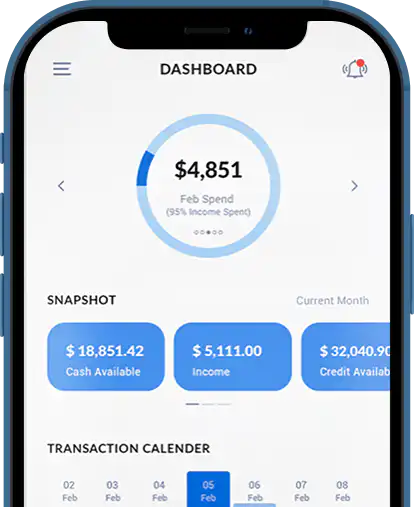
A Brand That Stands Out
More than 15,000 US & Canadian Financial Institutions Supported





Simple & Easy Steps
Connect your accounts and easily start tracking your spending, budgets, bills, investments, net worth and credit score.
01
Register
02
Add your Financial Institutions
03
Start Receiving Alerts & Insights

- Safe and Secure SSL Encryption
MoneyPatrol Is A Safe, Secure And Advanced Application To Track, Monitor And Manage Money

All data is securely transmitted from your financial institutions using 256-bit Military grade data encryption. Your data and information is secured and private. All data is read-only. No one can move money from one account to any other account.

MoneyPatrol has partnered with multiple data aggregators to ensure support for maximum number of financial institutions including credit card companies, banks, credit unions, and brokerages. We try our level best to ensure your data is always synced.
Broad Coverage of Financial Institutions

Checking Accounts
Connect your Checking accounts and track your spending, transactions and balances.

Savings Accounts
Connect your Savings accounts and track your balances, transactions and transfers.

Mortgage Accounts
Connect your Mortgage accounts and track your payments and receive reminders.

Investment Accounts
Connect your Investment accounts and track your holdings, transactions and balances.

Credit Cards
Connect your Credit Cards and track your spending, transactions and payments.

Loan Accounts
Connect your student loan and auto loan accounts and track balances and payments.

Business Accounts
Connect your business accounts and track your business spending, transactions and balances.

Gift Card
Connect your gift care accounts and track your transactions and balances.

Big & Small Banks

Brokerage Firms
Connect your brokerage accounts and track your investments.

Credit Unions
Connect all you Credit Unions and track Checking, Savings and Loan accounts.

Credit Card Providers
Connect all your Credit Card accounts and track your spending and payments.

Mortgage companies
Connect your mortgage accounts and track your payments and receive reminders.

Auto Loan Providers
Connect your Auto Loan accounts and track your payments and receive reminders.

Phone Companies
Connect your phone and cable billers to track usage and receive bill reminders.

Utility Companies
Connect your utility accounts and track you water, gas, electricity and sewage bills.
Your money is your life. Spend it well with MoneyPatrol.
Frequently Asked Questions
MoneyPatrol.com is safe and has secure SSL encryption. It has also earned the McAfee secure certification.
- Money Patrol uses multi-factor authentication to help protect access to the user account
- MoneyPatrol doesn’t store users’ bank and brokerage credentials on their servers.
Following are the top features of MoneyPatrol.com
- Advanced Dashboard with data drill down facility
- Get the latest transactions along with one-year data history
- Get informed about Money Out-flow and Money In-flow
- Know your Credit Usage, Rates, Balances, and Payments
- Track your available Money and Investment holdings
- See your spend Trends and Patterns over time
- Know your top Merchants and Categories by spend
- Get weekly, monthly, and yearly summaries
- Create Budgets to manage your expenses
- Receive detailed Text and Email alerts & insights
Following are the steps to sign up to MoneyPatrol.com:
- Go to the MoneyPatrol sign up page
- Click on the sign up button
- Enter your information, including Email, Password, and Mobile Number
- Once you have provided all the necessary information, click Create Account
You’ll get 15 days free trial period to try all of MoneyPatrol’s features.
To change your password:
- Login to MoneyPatrol.com using your credentials
- Go to settings (click on gear icon on top right corner)
- Click on the “SECURITY” tab
- Click on “Change Password”
- Enter current password and new passord
Tips: Your password should be unique, long, contains uppercase letters, lowercase letters, numbers, and special characters. You should never share your password with any one.
To enable/ disable dual factor authentication:
- Go to settings (click on gear icon on top right corner)
- Click on the “SECURITY” tab
- Toggle Enable / Disable button.
Note: Two-Factor authentication is an optional security feature to verify that it’s really you when you log into your MoneyPatrol account. This makes your account more secure.
- Once you have successfully created your MoneyPatrol account, login using your valid credentials on MoneyPatrol.com
- On dashboard, you will be prompted with an option to add your financial account.
- After clicking on the Add Account button, you will be asked to link the account via any one of the following API partner.
- Link account via Finicity
- Link account via Plaid
- Link account via Sherpa
- Link account via Yodlee
- We have partnered with multiple account aggregator to provide a comprehensive coverage for connecting to thousands of Financial Institutions. If you run into any issues while connecting your accounts, please send an email to support@moneypatrol.com
- On successful connection of your financial institution, you can start tracking and managing your finances on MoneyPatrol.com
- Checking Accounts
- Saving Accounts
- Personal Credit Card
- Business Accounts
- Mortgage Accounts
- Investment Accounts
- Student loan Accounts
- Gift Card
- Big & Small Banks
- Brokerage Firms
- Credit Unions
- Credit Card Providers
- Mortgage companies
- Auto Loan Providers
- Phone Companies
- Utility Companies
Yes, you can do that if the linked account doesn’t have the right type selelcted. Once you login into the MoneyPatrol.
Please follow the below steps to change the type of linked account:
- Go to the Accounts page.
- Click on edit icon below the “TYPE” tab.
- Popup window will open and here you can easily change your account type.
- Go to “User Setting”
- Click on “Alerts”
- Configure Text and Email Alerts
- Uncheck the “Text and Email Alerts”
- Checking Accounts
- Saving Accounts
- Personal Credit Card
- Business Accounts
- Mortgage Accounts
- Investment Accounts
- Student loan Accounts
- Gift Card
- Big & Small Banks
- Brokerage Firms
- Credit Unions
- Credit Card Providers
- Mortgage companies
- Auto Loan Providers
- Phone Companies
- Utility Companies
- Once you have successfully created your MoneyPatrol account, login using your valid credentials on MoneyPatrol.com
- On dashboard, you will be prompted with an option to add your financial account.
- After clicking on the Add Account button, you will be asked to link the account via any one of the following API partner.
- Link account via Finicity
- Link account via Plaid
- Link account via Sherpa
- Link account via Yodlee
- We have partnered with multiple account aggregator to provide a comprehensive coverage for connecting to thousands of Financial Institutions. If you run into any issues while connecting your accounts, please send an email to support@moneypatrol.com
- On successful connection of your financial institution, you can start tracking and managing your finances on MoneyPatrol.com
- Visit the user settings page.
- Click on the Billing.
- Click on the “Cancel” Button
- Here you can cancel your subscription.