

Household spending is rarely the problem. The lack of shared visibility is. When rent, groceries, childcare, subscriptions, and one-off kid expenses hit different cards and accounts, it gets hard to answer simple questions like: “Are we on track this month?” or “What do we actually spend on the house?”
A family finance app can solve that by giving you one place to capture shared costs, categorize them consistently, and review them on a simple cadence. The goal is not perfection, it is a system that prevents surprises and reduces money arguments.
What counts as “shared household costs” (and what does not)
Before you touch any app settings, agree on definitions. Most families struggle because they track transactions, but never decide what’s “household” versus “personal.”
A practical rule is: if the expense supports the home, the kids, or a shared lifestyle, it is shared. Everything else is personal unless you explicitly decide otherwise.
| Expense type | Usually shared? | Examples | Notes |
|---|---|---|---|
| Housing | Yes | Rent/mortgage, HOA, property tax | The anchor category for most budgets |
| Utilities | Yes | Electricity, water, gas, trash, internet | Consider seasonal swings |
| Groceries and household goods | Yes | Grocery runs, diapers, cleaning supplies | Separate “eating out” for clarity |
| Transportation for the household | Often | Gas, parking, family car payment | Keep commuting costs consistent with your agreement |
| Child-related costs | Yes | Daycare, school fees, activities | Track as its own category to avoid underestimating |
| Insurance | Often | Health, auto, home/renters | Confirm which policies are joint |
| Dining out and entertainment | Depends | Restaurants, movies, streaming | Many households split this into shared and personal |
| Personal discretionary | No | Hobbies, gifts, personal shopping | Creates fewer fights when clearly separated |
Pick a tracking model that matches how you already pay
The “best” approach is the one that matches reality. Choose a model based on how your income arrives and how bills are currently paid.
| Model | How it works | Best for | Common pitfall | How a family finance app helps |
|---|---|---|---|---|
| One payer, one reimbursement | One person pays most shared bills, the other reimburses monthly | Busy couples, uneven admin workload | Reimbursements get forgotten | A single dashboard shows total shared spend and what needs settling |
| Split by bill type | Each person owns specific bills (one pays rent, other pays childcare) | Stable recurring bills | “Invisible” imbalance when costs change | Category totals make the split visible over time |
| Joint account for household | Both contribute to one account used for shared spending | Strong “we” mindset | Mixed purchases muddy reporting | Categorization keeps shared vs personal clean |
| Hybrid (most common) | Joint for essentials, separate for personal | Families with varied priorities | Confusion about which card to use | Rules + alerts + a shared review cadence prevent drift |
If you are starting from scratch, the hybrid model is usually the easiest to maintain: shared essentials stay predictable, and personal spending stays private.
Set up your family finance app to track shared household costs
The setup that matters is simple: connect accounts, standardize categories, and create a repeatable review routine. Everything else is optional.
1) Centralize the “source of truth” for shared expenses
Shared costs often flow through:
- A joint checking account
- One or more shared credit cards
- Utility portals (autopay)
- Childcare and school payment systems
Whatever your structure, you want one place that reflects the full picture. The simplest method is to connect the accounts that actually fund shared expenses (joint account and any cards you both use).
If you keep separate accounts, you can still track shared costs by agreeing that specific cards or accounts are “household” and consistently using them for shared spending.
2) Create clear categories for household spending (and keep them stable)
Most budgeting fails because categories are either too broad (“Bills”) or too detailed (20 different subcategories nobody maintains). Aim for 8 to 12 household categories you can stick with all year.
A strong starting set:
- Housing
- Utilities
- Groceries
- Household supplies
- Transportation
- Insurance
- Childcare and kids
- Healthcare
- Dining out
- Subscriptions
- Home maintenance
- Travel (optional)
The key is consistency. When you keep the same categories, your month-to-month reports become genuinely useful.
3) Decide how you will label “shared” vs “personal” inside the app
Even in families with a joint account, not every transaction is truly shared (think: surprise gifts, personal care, solo travel). Decide on a rule you can apply quickly.
Two common approaches:
- Account-based rule: Anything on the joint account is shared, anything on personal accounts is personal.
- Category-based rule: Shared categories (rent, daycare) are always shared regardless of which account paid.
If you can follow the account-based rule, do it. It is easier and reduces debate.
4) Turn bills into a system, not a memory test
Shared costs tend to be recurring, which means they are perfect for automation and reminders.
Use your app’s bill tracking and reminders for:
- Rent/mortgage date
- Utility due dates
- Childcare tuition
- Insurance premiums
- Subscriptions that renew annually
The result is fewer late fees, fewer “Did you pay that?” conversations, and a clearer view of what’s coming next.
5) Add alerts that protect your plan (without spamming you)
Alerts work best when they are tied to decisions. Start with just a few:
- A notification when a large transaction posts (to catch surprises quickly)
- A reminder to review uncategorized transactions weekly
- A budget threshold alert for 1 to 2 categories you routinely overspend (often dining out and groceries)
Over-alerting makes everyone ignore the app. Keep it tight.

Make “shared cost tracking” fair, even when incomes are different
Many households do not split 50/50, and that is normal. The mistake is trying to force a simple split onto a complex reality.
Consider these fairness frameworks:
- Proportional split: Each person contributes based on income (for example, 60/40).
- Role-based split: One covers essentials, the other covers savings goals or childcare.
- Baseline plus flex: Both fund fixed costs proportionally, and discretionary shared spending gets a cap.
A family finance app helps here because it shows the totals by category. Instead of arguing about individual transactions, you can agree on a monthly category cap (for example, “Dining out stays under $300”) and then evaluate together.
If you want a reputable budgeting framework to sanity-check your totals, the CFPB provides a plain-language budgeting worksheet and guidance you can adapt for families: the Consumer Financial Protection Bureau budgeting resources are a solid starting point.
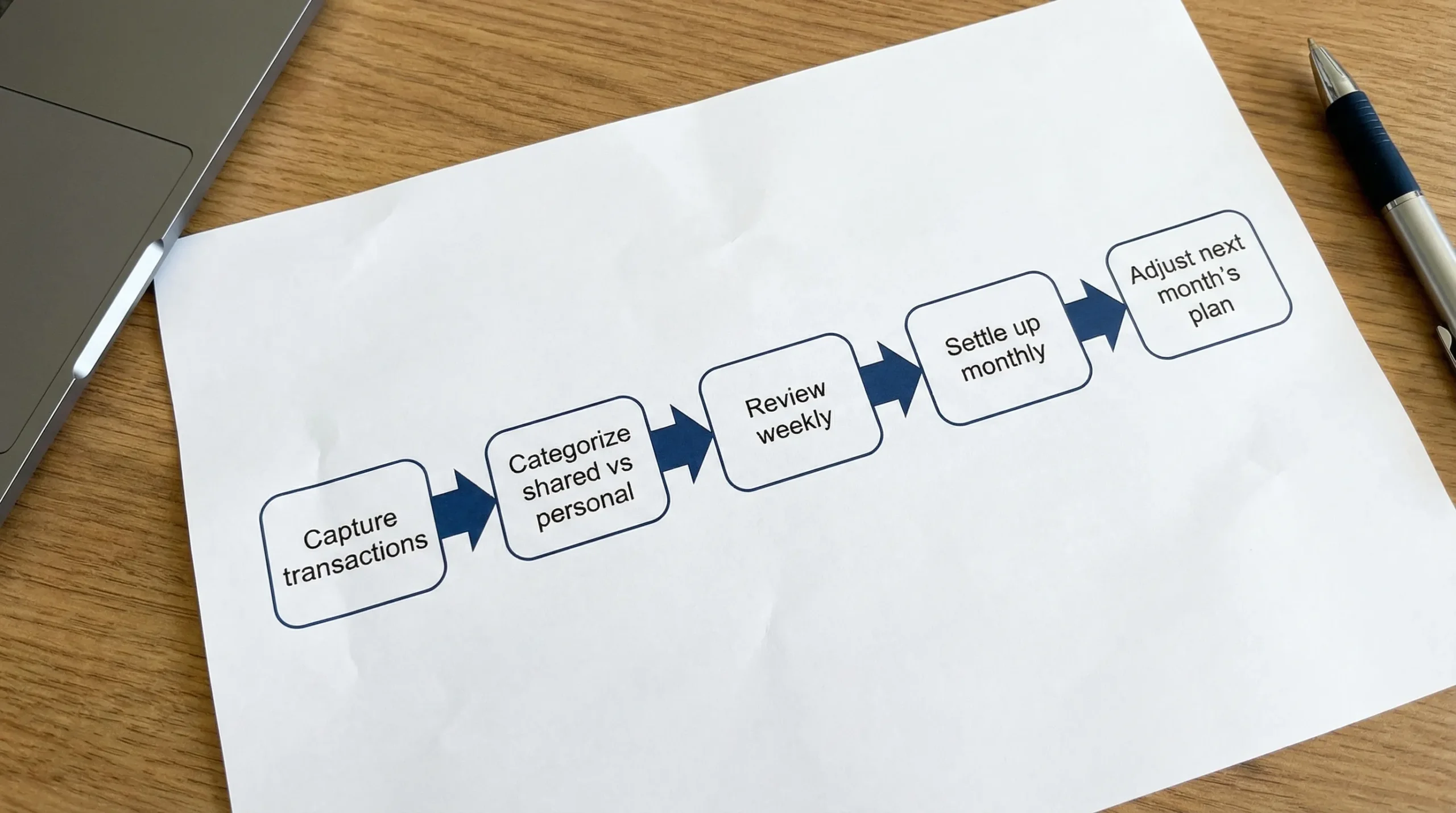
Build a simple household money routine (15 minutes a week)
The most effective “feature” is consistency. A quick weekly check prevents month-end panic.
Weekly (10 to 15 minutes)
- Review new transactions and fix mis-categorizations
- Confirm bills paid (or scheduled)
- Note one thing that surprised you (a price increase, a forgotten subscription)
Monthly (30 to 45 minutes)
- Review a category summary (what changed from last month?)
- Agree on 1 adjustment for next month (one cap, one cut, or one goal)
- Settle reimbursements if you use a split model
This routine also helps with “financial load balancing.” One person does not have to carry the entire mental burden.
Handling common shared-cost scenarios without stress
Groceries that keep blowing up
Groceries are a frequent pain point because prices fluctuate, and families tend to undercount small top-up trips.
Try:
- Track groceries separately from household supplies (so you can see what is really happening)
- Add a realistic buffer (many families need one)
- Use a weekly grocery target rather than a monthly number if that feels more controllable
Subscriptions you forgot you had
Subscriptions hide because they are small and recurring.
Do one quarterly “subscription audit”:
- Identify renewals and duplicate services
- Decide which are shared versus personal
- Cancel anything that no longer matches your priorities
The FTC’s guidance on subscription cancellations can be helpful if you get stuck in a confusing flow: FTC advice on canceling subscriptions.
Child-related expenses that do not feel “monthly”
Kids create spikes: back-to-school, camps, sports gear, birthdays. If you treat these as surprises, you will always feel behind.
Create one category for “Kids, activities, and school” and then use your reporting to estimate the average over the last 6 to 12 months. Convert that into a monthly target, even if spending is lumpy.
Reimbursements (school, work, family)
Reimbursements are where many shared-cost systems break down. The best practice is to track both sides:
- Record the original expense in the appropriate category
- When the reimbursement arrives, label it clearly so it does not look like “extra income” you can freely spend
If reimbursements are frequent, consider reviewing them weekly so the open items do not pile up.
Don’t skip reconciliation (it’s what makes the numbers trustworthy)
If your totals are wrong, you will stop using the system.
Reconciliation can be simple:
- Confirm that big bills posted (housing, childcare, insurance)
- Check for duplicates or missing transactions
- Fix uncategorized items
This is where personal finance apps earn their keep, because a clean transaction history produces clean reports.
Security and privacy: set expectations upfront
Shared finance tracking works best when everyone feels safe.
Discuss:
- Which accounts will be connected for household visibility
- Whether personal discretionary spending stays in separate accounts
- What level of detail you want to share (some couples share everything, others do not)
Also prioritize good security hygiene: strong unique passwords, device lock screens, and carefully controlling who has access to the “source of truth.”
How MoneyPatrol fits a family shared-cost workflow
MoneyPatrol is positioned as a free, all-in-one personal finance and budgeting app, which is useful for households because shared costs are rarely just “budgeting.” They include bills, debt, income timing, and ongoing monitoring.
Without changing your bank setup, you can use MoneyPatrol to support shared household tracking by:
- Connecting accounts from thousands of financial institutions to pull spending into one dashboard
- Categorizing and tracking expenses to separate household costs from personal spending
- Using budgeting tools to set realistic monthly targets for shared categories
- Tracking bills and debt, and using reminders to reduce missed payments
- Reviewing detailed reports to spot trends (like rising utilities or creeping subscriptions)
If you want to explore the platform at a high level first, you can start here: MoneyPatrol.
Frequently Asked Questions
What is the best way to split shared household costs? The “best” split is the one you can maintain without resentment. Many families prefer a proportional split based on income, plus a shared cap for discretionary categories like dining out.
Can a family finance app work if we keep separate bank accounts? Yes. You can still track shared costs by consistently paying household expenses from designated cards/accounts, then reviewing category totals together on a schedule.
How often should we review shared household spending? Weekly light check-ins (10 to 15 minutes) prevent errors and surprises, and a monthly review helps you adjust budgets and settle reimbursements.
How do we handle transactions that mix shared and personal items (like a big Target run)? Pick a rule you can apply quickly: either keep mixed purchases rare (use separate payments), or agree to reclassify the transaction to the dominant purpose (and accept some imperfection).
What categories should every household track? Housing, utilities, groceries, childcare/kids, transportation, insurance, dining out, subscriptions, and home maintenance cover most shared spending without getting too complex.
Will alerts help, or will they just annoy us? Alerts help when they drive action. Start with only a few (large transaction alerts, uncategorized transaction reminders, and one overspend category) and expand only if you keep using them.
Start tracking shared household costs with less friction
If your current system is scattered across texts, spreadsheets, and “I’ll remember later,” a family finance app can turn shared household spending into a repeatable routine.
MoneyPatrol offers a free personal finance dashboard with expense tracking, budgeting tools, bill and debt tracking, alerts, and reporting. You can try it here: MoneyPatrol.


 Our users have reported an average of $5K+ positive impact on their personal finances
