

Choosing the best personal finance app in 2025 is less about finding one “perfect” tool and more about finding the right system for how you actually manage money. Some people want a simple spending tracker, others need a full budget workflow, and many want an all-in-one view that includes bills, debt, investments, and credit.
This shortlist focuses on widely used, reputable options and the specific scenarios they fit best. You will also get a quick framework to evaluate any app in under an hour, so you can pick confidently instead of bouncing between free trials.
What “best” means for a personal finance app in 2025
Personal finance apps have converged on a few core capabilities (transaction tracking, categories, budgets), but they differ a lot in how they help you stay consistent. The “best” app is the one that makes good behavior easy.
Here are the criteria that matter most for most households right now.
| Criterion | Why it matters | What to look for in an app |
|---|---|---|
| Account coverage and syncing | You cannot manage what you cannot see | Reliable connections to your banks and credit cards, plus fast refreshes and fewer broken links |
| Budgeting method | Different brains stick to different systems | Zero-based budgeting, spending plan, envelope-style, or simple category limits |
| Bills, due dates, and reminders | Late fees are a silent budget killer | Bill tracking, reminders, and alerts when cash flow is tight |
| Reporting and clarity | “Where did it go?” is the #1 question | Trend views, category breakdowns, net worth tracking, and exportable reports |
| Custom alerts | A good app nudges you before problems compound | Low balance alerts, large transaction alerts, unusual spending, upcoming bills |
| Privacy and security posture | Finance apps are high-value targets | Transparent data practices, strong authentication options, and clear account-linking model |
A final, underrated filter: friction. If an app requires lots of manual upkeep and you will not do it weekly, pick a system designed for “set it up once, then monitor.” If you enjoy hands-on budgeting and want every dollar assigned intentionally, pick a more structured workflow.
Best personal finance app: 2025 shortlist (quick comparison)
This is not a “top 50” list. It is a practical shortlist of apps that consistently come up in real-world comparisons, each with a clear best-fit use case.
| App | Best for | Why it stands out |
|---|---|---|
| MoneyPatrol | Free all-in-one monitoring and budgeting | Broad feature set (expenses, budgets, bills, debt, investments, credit score) in one dashboard |
| YNAB | Hands-on, behavior-driven budgeting | Strong zero-based method and habit-building workflow |
| Monarch Money | Couples and households managing money together | Collaboration-friendly budgeting and net worth focus |
| Quicken Simplifi | Cash flow planning with simplified setup | Strong “spending plan” approach and practical tracking |
| Empower Personal Dashboard | Investment and net worth tracking | Particularly useful for portfolios and retirement planning views |
| Rocket Money | Subscriptions and recurring bill visibility | Strong at finding and managing recurring charges |
| EveryDollar | Simple, budget-first setup | Straightforward budgeting flow (especially for people who want structure) |
MoneyPatrol (best free all-in-one personal finance dashboard)
If your goal is to track spending, budgets, bills, and overall financial progress in one place without paying for yet another subscription, MoneyPatrol is worth a serious look.
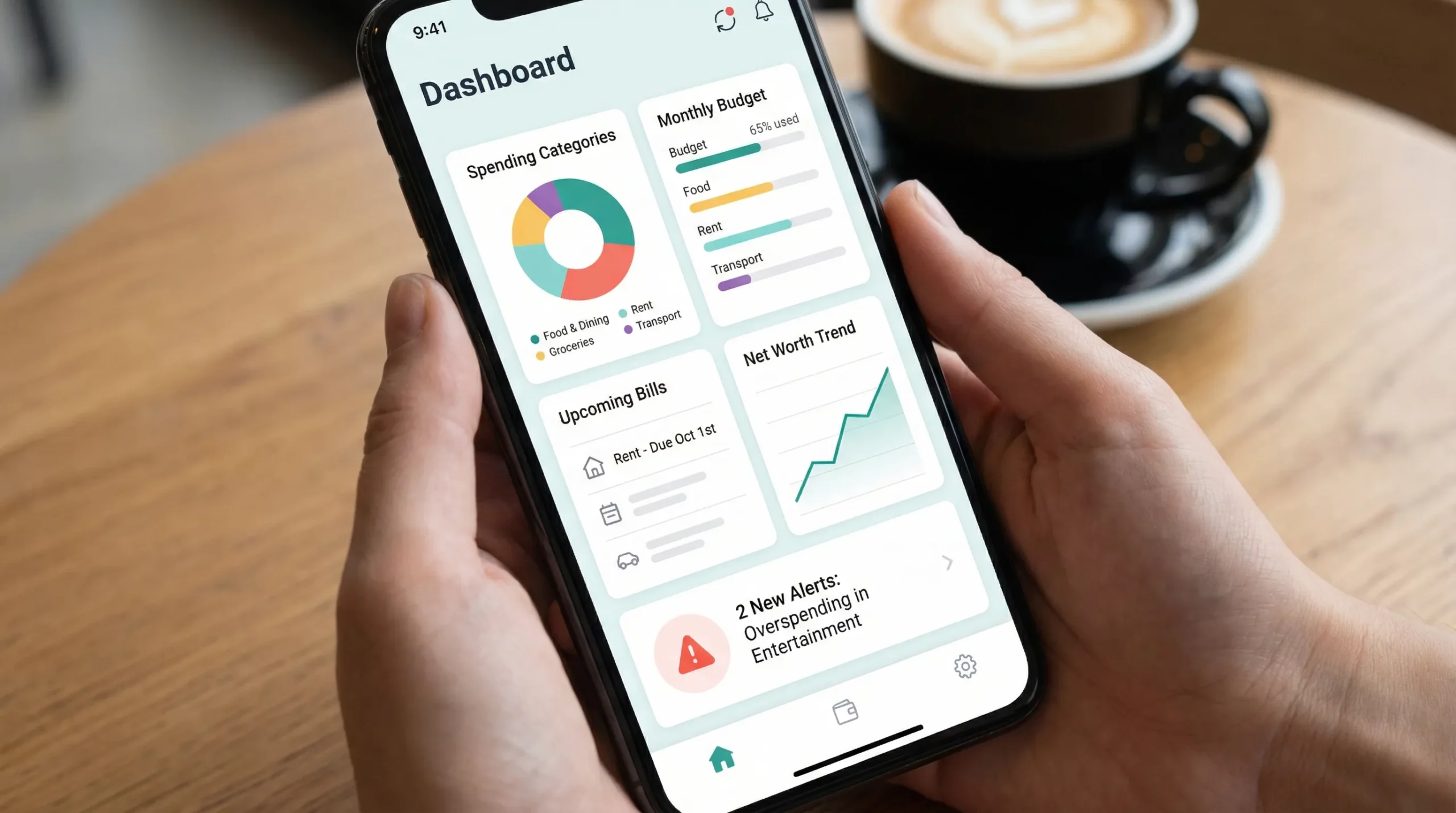
MoneyPatrol positions itself as a free, comprehensive personal finance and budgeting app. Its core value is breadth: it combines expense tracking and budgeting with bill and debt tracking, income management, investment tracking, credit score monitoring, customizable alerts, and detailed reports, all organized in a single dashboard. It also supports connectivity to thousands of financial institutions, which matters if you want a consolidated view across banks, cards, and accounts.
This “all-in-one monitoring” approach tends to work best for people who:
- Want visibility across accounts without building spreadsheets
- Prefer alerts and reports that highlight what changed (rather than manually auditing everything)
- Need both day-to-day budgeting and longer-term tracking (debt payoff, net worth, credit)
If you are evaluating tools after the Mint era, MoneyPatrol is especially relevant because it aims to cover the full “home base” use case: one place to monitor the financial picture and keep momentum on goals.
YNAB (best for people who want a strict budgeting system)
YNAB is best for users who want budgeting to be a weekly habit, not a monthly glance.
Its standout is the method: zero-based budgeting, where you assign dollars to categories intentionally and adjust as reality changes. People who succeed with YNAB often like the feeling of control and the built-in discipline.
Choose YNAB if you:
- Want a structured framework for decisions (not just tracking)
- Are paying down debt or rebuilding savings and need tighter guardrails
- Do not mind spending time categorizing and reviewing regularly
Skip it if you want “set it and forget it” monitoring. YNAB is powerful, but it expects engagement.
Monarch Money (best for couples and shared financial planning)
Monarch Money is a strong pick when money management is a shared project. Many households struggle because one person tracks, the other spends, and nobody feels aligned.
Monarch is often chosen for its household-friendly approach to budgeting, goals, and net worth, plus a product experience geared toward visibility and planning rather than just transaction logs.
It is typically a better fit if you:
- Manage finances with a partner and want shared visibility
- Care about tracking net worth and long-term progress
- Prefer a modern interface and planning-oriented flow
Quicken Simplifi (best for cash flow clarity with less complexity)
Simplifi is a practical middle ground between strict budgeting systems and basic expense trackers.
Its biggest appeal is usually the cash flow lens: helping you see what is “available to spend” after recurring bills and planned expenses, without demanding that you micromanage every category the way a strict zero-based system might.
Simplifi is a good fit if you:
- Want budgeting and bill planning, but not heavy process
- Value clear month-to-month spending trends
- Prefer a tool that feels less “financial diet,” more “financial dashboard”
Empower Personal Dashboard (best for investments and net worth tracking)
Empower is commonly used by people who primarily want to track investments, retirement progress, and net worth, with spending as a secondary benefit.
If your main question is, “How am I doing overall, across all accounts?” Empower can be a strong choice, especially when you have multiple investment accounts and want consolidated views.
It is often best for:
- Portfolio-heavy households
- People focused on long-term planning metrics
- Users who want net worth tracking more than granular budgeting
Rocket Money (best for subscriptions and recurring charges)
Recurring expenses have become one of the most frustrating parts of modern money management. Between streaming, apps, memberships, and “free trials,” it is easy to bleed money quietly.
Rocket Money is frequently chosen for subscription visibility and recurring bill management. If your finances feel fine “on paper” but your checking account tells a different story, subscription cleanup can be a fast win.
Rocket Money is a good fit if you:
- Want to identify and reduce recurring charges
- Keep discovering subscriptions you forgot about
- Prefer a tool focused on optimization rather than full budgeting methodology
EveryDollar (best for simple, budget-first structure)
Some people do not want dashboards, net worth charts, or complex categorization rules. They want a simple plan for the month and a place to track it.
EveryDollar is best for users who want a straightforward budgeting experience and prefer a “budget-first” approach over extensive analytics.
It is often a fit when:
- You are new to budgeting and want simplicity
- You want to focus on your monthly plan and consistency
- You prefer fewer features if it means fewer distractions
How to pick the best personal finance app for your situation
Instead of asking, “Which app has the most features?” ask, “Which app makes my next 90 days easier?” Use these matchups.
If you want a free option that still covers the basics (and more)
Look for a tool that does not gate essential workflows behind a paywall. A free all-in-one dashboard can be a strong fit if you want to track spending and progress without adding another subscription.
MoneyPatrol is positioned for this use case, combining expense tracking, budgeting, bill and debt tracking, investment tracking, credit score monitoring, alerts, and reports in one place.
If your main goal is stopping overspending
Pick a strict budgeting system that forces tradeoffs in real time. This is where a method-forward tool like YNAB often shines.
If you are planning together (partner, spouse, family)
The “best” app is the one both people will open. Choose a collaboration-friendly tool built for household budgeting and shared goals, such as Monarch.
If you travel frequently and want spending control on the go
Frequent travel creates messy expenses (currency conversion, split costs, separate bookings, and irregular spending). Your finance app should handle categorization and alerts well, but it also helps to pair it with travel-specific tools.
If you are building a budget travel stack, this roundup of travel apps for budget travelers is a useful companion list (especially for planning, transportation comparisons, and splitting costs).
Security and privacy: a quick checklist before you link accounts
Any app you choose should earn your trust. While security details vary by provider, you can reduce risk by doing a few checks before connecting accounts.
- Review the app’s privacy policy and data-sharing disclosures
- Use strong, unique passwords and enable multi-factor authentication where available
- Prefer apps that provide clear alerting for large or unusual transactions
- Avoid linking accounts on public Wi-Fi, especially during initial setup
For general guidance on protecting personal information online, the FTC’s consumer resources are a reputable starting point.
A fast way to test any app in under 45 minutes
If you are torn between two or three options, run a small “trial” so you pick based on reality, not marketing.
Step 1: Connect or import only your primary accounts
Start with the checking account you spend from and one primary credit card. The best app should quickly show you what matters without requiring a full weekend setup.
Step 2: Validate categorization quality
Scan the last 30 days and see how much the app gets right automatically. If you have to fix everything, the tool will become homework.
Step 3: Create one budget or spending rule you actually care about
Pick something concrete like dining out, groceries, or shopping. Then see whether the app makes it easy to track progress and adjust.
Step 4: Turn on two alerts
A good baseline:
- Large transaction alert
- Low balance or upcoming bill alert
Step 5: Check reporting
Look for a month view that answers:
- What categories drove spending this month?
- What changed versus last month?
- What is my net worth trend (if you care about long-term tracking)?
If an app does not answer those quickly, it might not be your “home base.”
Frequently Asked Questions
What is the best personal finance app in 2025? The best personal finance app in 2025 depends on your goal: strict budgeting (YNAB), shared household planning (Monarch), cash flow visibility (Simplifi), investments (Empower), subscription cleanup (Rocket Money), or a free all-in-one dashboard (MoneyPatrol).
Which personal finance app is best for budgeting and bill tracking together? Look for an app that combines budgeting with bill due dates, reminders, and alerts. All-in-one tools are often better here than apps focused only on subscriptions or only on investing.
Are personal finance apps safe to link to bank accounts? Many are designed to be used this way, but safety depends on the provider’s security practices and your own account hygiene. Use strong passwords, enable multi-factor authentication, and review privacy policies before linking.
Do I need a budgeting app if I already track spending in my bank app? Bank apps can show transactions, but personal finance apps often add cross-account visibility, better categorization, budgeting rules, bill reminders, goal tracking, and reporting that helps you change behavior.
Try an all-in-one, free personal finance dashboard
If you want a single place to track expenses, budgets, bills, debt, investments, and credit, you can try MoneyPatrol as your home base.
Explore the platform here: MoneyPatrol


 Our users have reported an average of $5K+ positive impact on their personal finances
