

If you’ve ever opened your bank statement and thought, “Where did my money go?”, the answer is usually hiding in one place: your expense categories.
The best expense tracking app is only as useful as the categories you use inside it. Done right, categories turn messy transactions into clear decisions, like which bills to renegotiate, which subscriptions to cancel, and which “small” habits are quietly draining your cash.
Below is a practical, savings-focused way to set up categories so your tracker does more than record spending, it helps you spend less without feeling deprived.
Why categories matter more than the app itself
Most people don’t overspend in one giant purchase. Overspending tends to happen through:
- Mixed transactions (Target runs, Amazon orders, Costco trips)
- Repeating “small” costs (delivery fees, app subscriptions, bank fees)
- Lifestyle creep (more dining out, rideshares, convenience buys)
When categories are too broad (like “Shopping”), you miss the pattern. When they’re too detailed (like 70 micro-categories), you stop using them.
A good category system should:
- Make tradeoffs obvious (for example, “Dining Out” vs “Groceries”)
- Highlight recurring waste (fees, subscriptions, interest)
- Support action (alerts, budgets, and trend reports)
The money-saving category framework (simple and effective)
Instead of categorizing “by store” (Amazon, Walmart), categorize “by purpose” (household essentials, personal care, gifts). That’s how you learn what to change.
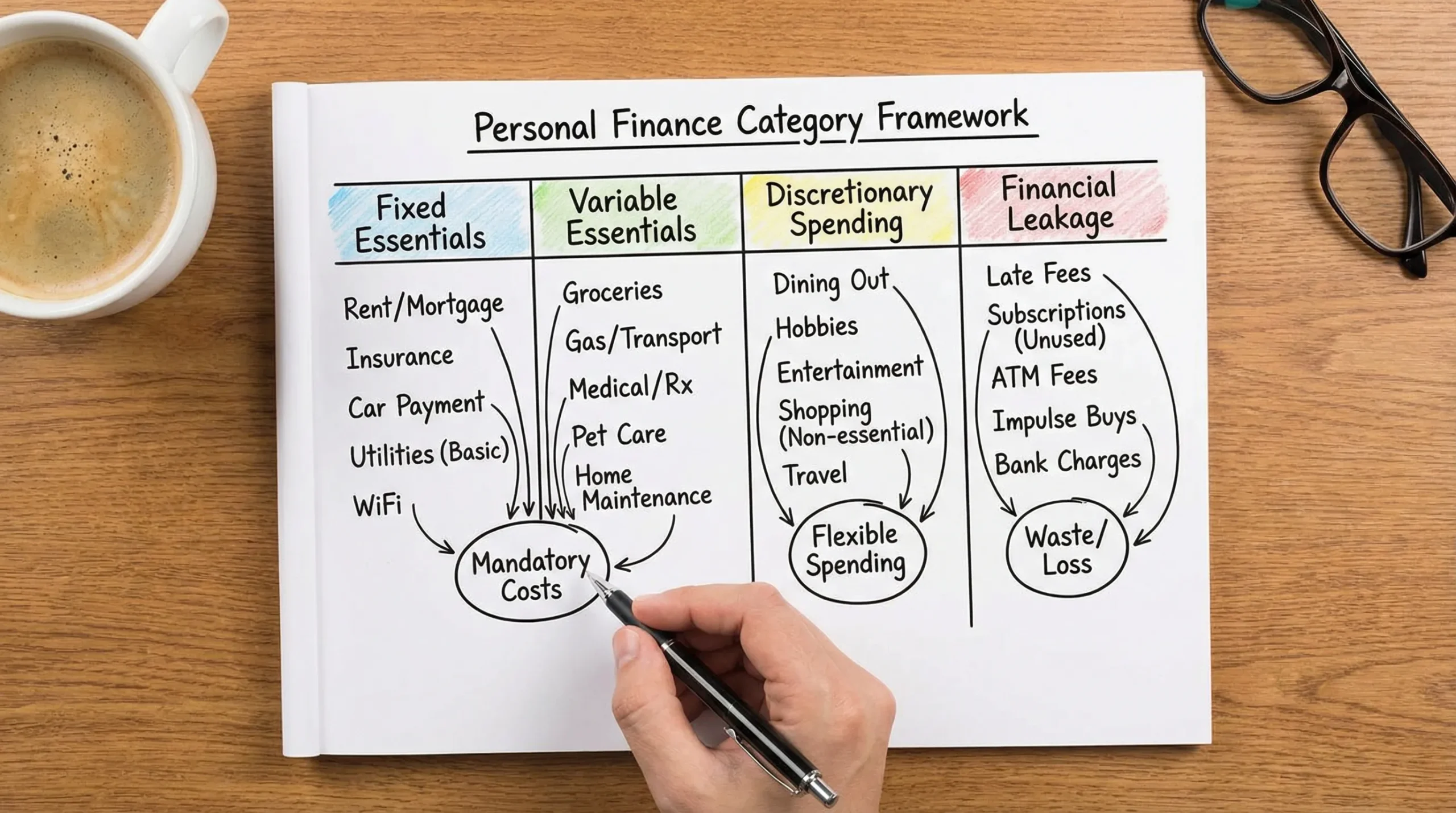
A practical structure is:
- Fixed essentials (hard to change quickly, but big impact over time)
- Variable essentials (can be optimized month to month)
- Discretionary spending (where quick wins usually live)
- Financial leakage (fees, interest, subscriptions, waste)
This works especially well in an app that supports budgeting, reports, and alerts, because you can set tighter controls where it matters.
Categories that reliably save you money (and why)
1) Subscriptions and memberships (the fastest “found money”)
This category is one of the highest ROI categories because it’s usually:
- Easy to cancel
- Often forgotten
- Replaced by cheaper alternatives
What to include:
- Streaming services, apps, software
- Gym memberships, membership clubs
- “Free trial” conversions
Money-saving move: do a quarterly subscription audit and keep only the services you used in the last 30 days.
Helpful habit: set an alert for any new recurring charge so you catch trial conversions early.
2) Fees and interest (pure loss, no lifestyle benefit)
If you want categories that save money without changing your routine, start here. Fees and interest are spending you get nothing from.
What to include:
- Bank fees, ATM fees, late fees
- Credit card interest, loan interest (separate from principal)
Money-saving move: treat this like a “red alert” category. Your goal is to drive it down toward zero.
Tip: If an app supports customizable alerts, set one for any fee transaction and any interest charge above your normal range.
3) Groceries vs dining out (where budgets go to die)
Many households underestimate food spending because it gets split across grocery stores, restaurants, delivery apps, and convenience stops.
Split your food spending into at least:
- Groceries (ingredients and household staples)
- Dining out (restaurants)
- Delivery and takeout (including delivery fees and tips)
Money-saving move: reduce delivery first (usually the most expensive per meal), then dining out.
Why this works: it’s easier to keep a “restaurant budget” than a vague “food budget.”
4) Convenience spending (the hidden lifestyle tax)
This is the category most people don’t track, and it’s often the reason savings don’t grow.
What to include:
- Convenience stores
- Coffee runs
- Impulse snacks, vending, “quick stops”
Money-saving move: cap it with a weekly limit. Convenience spending is easier to control weekly than monthly.
5) Shopping split into “essentials” and “wants”
“Shopping” is too broad to change behavior. You need at least two buckets.
- Household essentials: cleaning supplies, toiletries, basic clothing replacements
- Nonessential shopping: gadgets, decor, hobby buys, “just because” purchases
Money-saving move: create a 48-hour rule for nonessential shopping. Most impulse buys fade quickly.
6) Transportation split by controllability
Transportation is a major spending area for many households. The best way to categorize it is by what you can optimize quickly.
- Fuel or EV charging
- Public transit
- Rideshare and taxis
- Parking and tolls
- Car maintenance
Money-saving move: track rideshare separately. People often discover it’s larger than they thought, especially when it replaces transit.
7) Utilities and household services (easy to negotiate)
These bills feel fixed, but many are negotiable or shoppable.
What to include:
- Internet, mobile, cable
- Electricity, gas, water
Money-saving move: once you have 3 to 6 months of trend data, call providers and negotiate, or shop alternatives. Many providers offer retention deals.
8) Insurance (big wins, low frequency)
Insurance doesn’t show up often, so people don’t analyze it. But it can have a large annual impact.
What to include:
- Auto, renters, homeowners
- Life and disability
Money-saving move: review annually, compare quotes, and raise deductibles if you have sufficient emergency savings.
9) Medical and health (protects your finances)
This category saves money indirectly by preventing bigger problems.
What to include:
- Copays, prescriptions
- Dental and vision
- Therapy, preventive care
Money-saving move: separate “recurring medical” from “one-time events” so you can budget realistically and avoid surprises.
10) Cash withdrawals (a leak detector)
Cash makes spending harder to analyze. Categorizing withdrawals helps you spot when cash is masking overspending.
Money-saving move: set a monthly cap and note what cash is used for. If a large share is “untracked,” it’s usually a budget problem.
A recommended category set you can copy
Most people do well with 10 to 15 core categories. You can always add detail later.
Here’s a balanced set that works for most households:
- Income
- Housing (rent or mortgage)
- Utilities
- Groceries
- Dining out
- Delivery and takeout
- Transportation
- Insurance
- Debt payments
- Subscriptions
- Shopping (essentials)
- Shopping (nonessential)
- Health
- Fees and interest
- Miscellaneous (temporary holding category)
The key is to keep “Miscellaneous” small. If it grows, your categories are too vague.
The best categories for saving money (quick reference table)
| Category | What belongs here | Why it saves money | What to look for in your reports |
|---|---|---|---|
| Subscriptions | Streaming, apps, gym, memberships | Easy cancellations and downgrades | Recurring charges you forgot |
| Fees and interest | Bank fees, late fees, interest | Pure waste, no benefit | Any month-to-month increase |
| Delivery and takeout | Delivery apps, delivery fees, tips | Highest cost per meal | Frequency, average order size |
| Dining out | Restaurants, bars | Easy to cap with a budget | “Weekend spikes” |
| Convenience spending | Coffee, quick stops, snacks | Small purchases add up fast | High transaction count |
| Shopping (nonessential) | Impulse buys, hobbies, decor | Behavior-driven, quick wins | Repeat merchants, late-night spending |
| Rideshare | Uber/Lyft/taxis | Often replaces cheaper options | Trips per week |
| Utilities and mobile | Internet, phone, power | Negotiable and shoppable | Seasonal changes, price jumps |
How to use categories inside an expense tracking app to actually save
Use a “review rhythm” that matches real life
Savings comes from noticing patterns early.
- Weekly: check discretionary categories (dining, delivery, convenience, shopping)
- Monthly: check fixed categories (housing, utilities, insurance) and recurring charges
- Quarterly: subscription audit, negotiate bills, reset budgets
If your app provides detailed financial reports and insights, your job is to review them consistently, not perfectly.
Set category alerts where overspending is likely
Alerts work best for categories that can spiral quickly:
- Delivery and takeout
- Rideshare
- Fees and interest
- Subscriptions (especially “new recurring”)
A good rule is: alert for anything you’d want to know within 24 hours, not 30 days.
Reconcile categories for mixed purchases
Big-box and online retailers often contain multiple types of spending. If your app supports account reconciliation, use it to clean up category accuracy.
Example: one Target run might include groceries, toiletries, a toy, and home decor. Without adjustment, your insights will be wrong.
Make categories match your goals
If your goal is paying down debt, separate:
- Debt principal payments
- Interest (under “fees and interest”)
If your goal is saving for travel, consider a “travel sinking fund” category so you can plan without breaking your monthly budget.
What to look for when choosing the best expense tracking app for categories
If “categories that save you money” is your goal, prioritize an app that supports:
- Easy category edits and rules
- Budgeting by category
- Alerts and reminders for key categories
- Reports that show trends over time
- Account connectivity, so you see the full picture (not just one card)
MoneyPatrol is built around these needs, combining expense tracking, budgeting, bill and debt tracking, alerts, and detailed financial reports in one personal finance dashboard. You can learn more on the MoneyPatrol homepage.
Frequently Asked Questions
How many expense categories should I use? Most households get the best results with 10 to 15 core categories. Too few hides patterns, too many becomes hard to maintain.
What category saves the most money for most people? Subscriptions and fees/interest are common “easy win” categories because you can cut them with minimal lifestyle change.
Should I categorize by merchant (Amazon, Walmart) or by purpose (groceries, household)? Categorize by purpose. Merchants sell many things, and you want insights that lead to behavior changes.
What if I have lots of “miscellaneous” spending? That usually means your categories are too broad. Review the biggest miscellaneous transactions and create one new category that fits most of them.
How often should I review my expense categories? Weekly for discretionary categories and monthly for fixed and recurring costs. A quarterly subscription audit is also a strong habit.
Turn better categories into better decisions with MoneyPatrol
If you want the best expense tracking app experience, focus on two things: accurate categories and consistent review.
MoneyPatrol helps you put this into practice with expense tracking, budgeting tools, customizable alerts and reminders, and detailed reports, all in a single dashboard. Get started at MoneyPatrol and build categories that help you save month after month.



 Our users have reported an average of $5K+ positive impact on their personal finances
